Hướng dẫn Uniform Control
Staff Uniform Tracking Template: How to Track Uniforms by Employee
Colin, The Quiet Concierge ·
Bài viết bằng tiếng Anh.
Uniforms disappear quietly. A jacket goes home in a bag, a size runs out the week a new hire starts, and nobody can say who holds what. A staff uniform tracking template fixes this by recording every piece once when it is bought, once when it is issued and once when it comes back. This guide shows what to record, how to lay it out in a spreadsheet, and how to run it each month.
The short answer: how do you keep track of employee uniforms?
You need three records that talk to each other:
- An item list. Every uniform piece, with its department, cost and how long it should last.
- A stock count by size. What is on the shelf, with a par level and a reorder point.
- An issue log by employee. Every issue, return and loss, tied to an employee code.
If you only keep the log, you cannot see stock. If you only keep stock, you cannot see who holds what. Link all three and you can answer the questions that matter: what do we need to order, who is due a replacement, and what did this leaver not hand back.
Step 1: Build the item list
List each piece once. Do not list “housekeeping uniform” as one line if it is really a tunic, trousers and an apron. Columns to include:
- Item name and department
- Pieces issued per employee (for example, 2 tunics per room attendant)
- Unit cost
- Replacement cycle in months
- Supplier and lead time in days
From these you can work out two useful figures: the stock value of each item and the annual cost per employee.
Worked example (replace with your own numbers)
| Item | Pieces per employee | Unit cost | Cycle (months) |
|---|---|---|---|
| Tunic | 2 | 20.00 | 12 |
| Trousers | 2 | 15.00 | 12 |
| Apron | 1 | 6.00 | 6 |
Set cost: 2 x 20 + 2 x 15 + 1 x 6 = 76.00. Annual cost per employee: tunics 40.00, trousers 30.00, aprons 12.00 (two a year), so 82.00. These figures are an example only. Use your own prices and cycles.
Step 2: Count stock by size
Uniform stock fails at the size level. You may have 40 jackets and none that fit the next hire. Give each item and size its own line, and record:
- Opening count
- Received, issued and returned
- On hand (opening + received + returned - issued)
- Par level: the quantity you want to hold
- Reorder level: the quantity at which you order
- Order quantity
Set the reorder level using lead time. If a supplier takes six weeks, your reorder level must cover six weeks of expected issues plus a safety margin.
Step 3: Give every employee a code
Track people by code, not by name. Keep names and personal details in your HR system. For each code record the sizes, and what the person already holds. For uniforms issued before you started the tracker, log them as an opening balance so they count as held by the person but do not change stock.
Step 4: Log every movement
Each line in the issue log needs: date, employee code, item, size, quantity and movement type. Useful movement types:
- Issue
- Return
- Lost
- Replacement
- Held at start
Add a replace-by date to every issue (issue date plus the item’s cycle). A row is due when the replace-by date has passed and no newer replacement exists for that person and item.
Step 5: Handle leavers
Make leaver returns routine, not a scramble on the last day.
- Pull the list of everything the employee still holds
- Check each piece against what is handed back
- Record returns and anything lost
- Get sign-off from the uniform room, the department head and HR
- Update the employee record
Rules on uniform provision and pay deductions for unreturned items differ by country. Check local requirements before you deduct anything.
Step 6: Review monthly
Once a month, spend twenty minutes on four checks:
- Which sizes are at or below reorder level?
- Which replacements are due?
- Which leavers still hold items?
- What did each department spend on uniforms compared with its budget?
The last check connects uniforms to your wider cost control. If you are building next year’s numbers, see How to Build a Hotel Budget: A Step-by-Step Method for General Managers.
Spreadsheet or template?
A staff uniform tracking spreadsheet works well if you keep the three records separate but linked, and use drop-down lists for departments, sizes and movement types so entries stay consistent. Free-typed sizes (“M”, “Med”, “medium”) break your counts quickly. Build the formulas once, protect them, and only type into the input cells.
If you want to see how a ready-made checklist is laid out before building your own, try the free hotel checklist sample.
Templates
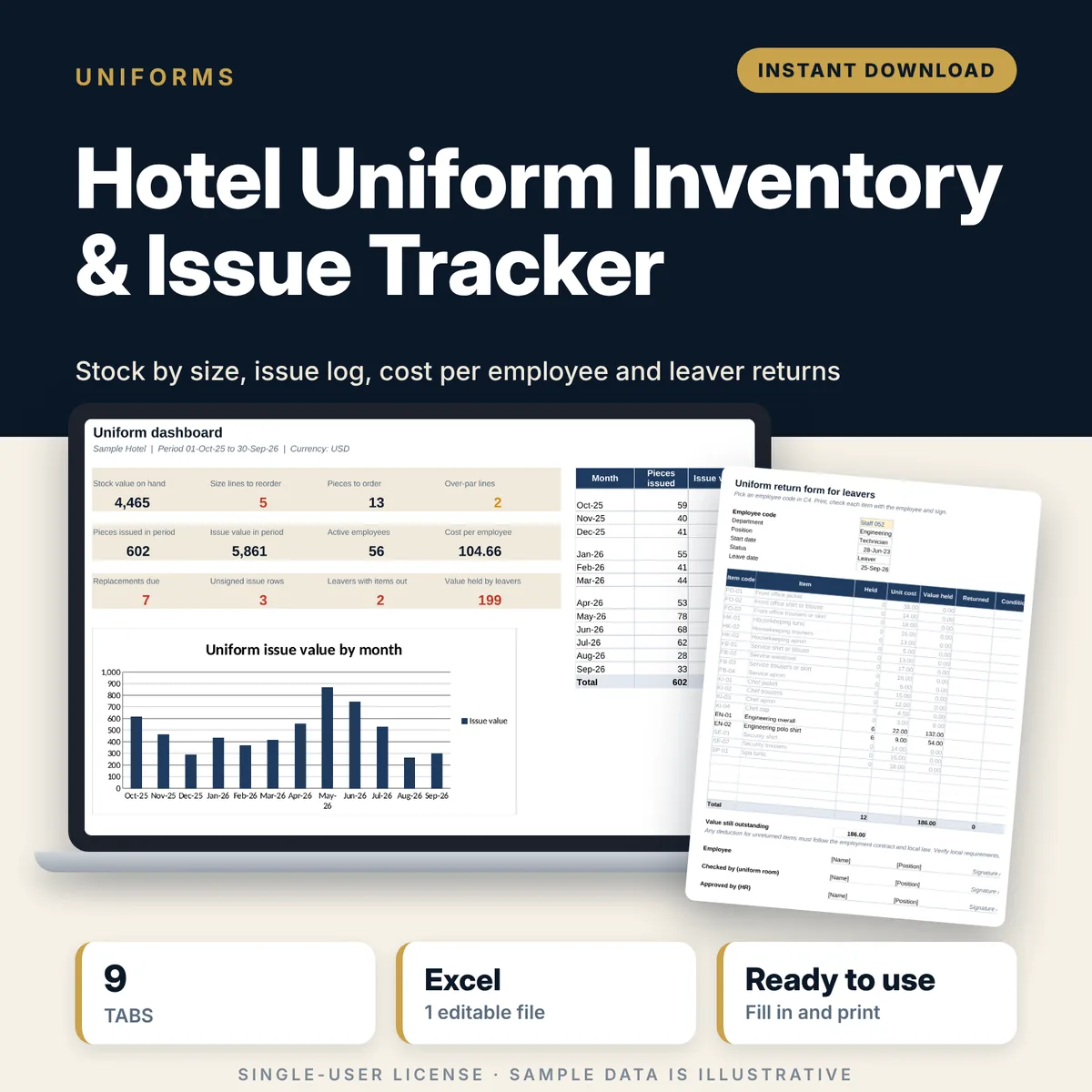
The Hotel Uniform Inventory & Issue Tracker is an Excel workbook (.xlsx, no macros) for HR managers, housekeepers and uniform room staff. Its tagline: know what is on the shelf, who holds what, and what each department spends on uniforms.
You set up each item once with its department, pieces per employee, cost and replacement cycle. Then you log every issue, return and lost piece by employee code. The workbook has 9 tabs:
- Settings: report date, period start, tracker start and an over-par setting, plus drop-down lists for 7 departments, 7 sizes and 6 movement types.
- Item_Master: room for 30 items, with pieces per employee, unit cost, replacement cycle, supplier, lead time, stock value and annual cost per employee.
- Stock_by_Size: room for 160 item and size lines, with par, reorder level, status and order quantity.
- Employees: room for 150 employee codes, with sizes, pieces and value held, and a return check for leavers.
- Issue_Log: room for 1,500 movements, with replace-by dates and a status of Due, Not due, Replaced or Leaver.
- Cost_per_Employee: cost per employee for 7 departments against a pro-rated replacement budget, with a chart.
- Leaver_Return_Form: pick an employee code to print every item still held, its value, and sign-off lines for 3 roles.
- Dashboard: 12 KPI tiles, issues by month and 2 charts.
The sample items, costs, codes and movements are illustrative, so replace them with your own data. Employees are tracked by code only. It works in Excel 2016 or later, and it opens in Google Sheets, where you should check the drop-downs and colour flags after import. Delivery is an instant digital download, with a single-user license.
It is also part of the Ultimate Hospitality Library and the All-Access Hospitality Template Library.
Muốn xem định dạng trước khi mua? Tải bộ checklist khách sạn miễn phí